30 SQL Practice Questions for Beginners with Answers and Explanations
You have learned to write SELECT and WHERE, but a teacher now asks you to answer a question without showing you the query. Which table should you read? Which columns belong in the result? Should you use GROUP BY, or does that change the meaning of the question? If a JOIN returns more rows than expected, how do you decide whether those extra rows are errors or legitimate repeated observations?
The way to become confident is to solve real tasks independently, inspect your outputs, and learn what went wrong. This standalone workbook contains 30 SQL practice questions for beginners, each with an optional hidden hint and a separate expandable answer. All results were generated by executing the exact corresponding SQL on a consistent, entirely fictional four-table SQLite database. The questions start with data retrieval and finish with a six-column analytical report that joins three tables without inflating counts.
These are new assessment-focused questions, not a copy of the introductory tutorial’s practice section. The article SQL for Data Science Beginners: Learn Queries with Practical Examples provides the longer concept-by-concept teaching lesson. Here the purpose is to practise first, reveal second. You can complete the workbook in a free SQLite desktop application, a Python notebook, or another suitable local SQL environment that supports SQLite.
No real school records are used. The dataset includes only fictional student codes, subjects, resource catalogs and made-up usage sessions, so you can experiment without collecting personal information. The printed and interactive answers show the queries, their actual outputs, their meaning, and typical errors. If you find a different query that returns the right result for the intended task, compare its logic rather than merely matching one preview.
What you will practise and how to use this workbook
Level 1 (questions 1–10): retrieve, choose, filter and sort rows using SELECT, WHERE, DISTINCT, logical operators, LIKE, ORDER BY and LIMIT. Level 2 (questions 11–20): aggregate, group, compare measured values, calculate completion percentages and distinguish access events from distinct students. Level 3 (questions 21–30): JOIN related tables, preserve unmatched cases, use subqueries, CASE, CTEs, window functions and produce a carefully verified analytics report.
For each question, read the task and check which tables and columns are relevant. Decide what one output row should represent—one subject, one learning resource, one usage event, or one student code. Write the query before opening the hint. If it fails, inspect the table names and constraints, and try a small query. Only then reveal the answer, compare the column names, row count, sort order and values, and read the explanation and mistake note.

Set up the fictional practice database
The Global Student Learning Resources Database is the same verified SQLite fixture used in Topic 64. It contains exactly 24 students, eight subjects, 31 catalog resources, and 160 recorded usage events. The earlier prompt’s suggested counts of 25/8/32/150 are recommendations, not a requirement to alter a verified database. Reusing the existing fixture keeps the subjects, usage dates, relationships and answers consistent across both articles.
| Table | Primary key | Purpose |
|---|---|---|
| Students | student_id | Fictional student_code, study_level, region and enrollment_year |
| Subjects | subject_id | subject_name and subject_category |
| Resources | resource_id | Resource description plus subject_id foreign key |
| ResourceUsage | usage_id | Fictional student_id, resource_id, access_date, minutes_spent, completed |

Each ResourceUsage row identifies one fictional student and one listed resource. Subjects contains Astronomy with no catalog resources, while Resources includes Market Structures with no usage event. Nine duration values in ResourceUsage are NULL; this tests whether students distinguish missing measurements from zero minutes. The completed flag is either zero or one, and dates use a consistent YYYY-MM-DD format.
Method A — DB Browser for SQLite: Download the free editor from its official site. Open student_learning_resources.db, select the Execute SQL tab, paste your query and run it. Read the results grid and compare it with the hidden answer. Method B — Python: use Python’s built-in sqlite3 module. You do not have to install a database server.
import sqlite3
connection = sqlite3.connect("student_learning_resources.db")
connection.execute("PRAGMA foreign_keys = ON")
rows = connection.execute("SELECT subject_name FROM Subjects ORDER BY subject_id").fetchall()
print(rows)
connection.close()
If the file does not exist in your working directory, sqlite3 may create an empty database; check the table list and counts before concluding that the supplied query is incorrect. Keep the original file unchanged by using a copy for experiments. The standalone SQL setup script recreates the same four tables and exact fictional records from scratch, and the included verification file contains complete results for all 30 queries.
Quick reference: essential SQL commands
| Keyword | Beginner purpose |
|---|---|
| SELECT / FROM | Choose outputs and identify a data source |
| DISTINCT / WHERE | Remove duplicate result values and filter records |
| AND / OR / IN / LIKE | Combine conditions and match values or patterns |
| ORDER BY / LIMIT | Sort, then return the requested number of rows |
| COUNT / SUM / AVG | Count observations and summarize numerical values |
| GROUP BY / HAVING | Form groups and filter them using aggregates |
| INNER JOIN / LEFT JOIN | Combine matching records or preserve unmatched left rows |
| CASE / COALESCE | Derive labels and handle absent values intentionally |
| WITH / ROW_NUMBER | Define readable subqueries and rank within groups |
SQLite is the official dialect for this workbook. Basic SQL concepts transfer to MySQL, PostgreSQL and SQL Server, but some date, grouping and window-function syntax differs. In the examples below, ORDER BY is included whenever the output order matters, and COUNT(DISTINCT ...) is used when the task asks for unique entities rather than repeated usage events. The sample results are computed, not invented.

Level 1 — SQL foundations (Questions 1–10)
These ten questions test precise reading, basic column selection, text and numeric filtering, and reproducible ordering. Each is worth one point in the optional self-assessment rubric. Try to explain in one sentence what a returned row represents before looking at the answer. If two queries appear equivalent, consider how they might differ when rows are added or when ties occur.
1. Retrieve all subjects and their identifiers
Difficulty: Beginner · Skill: SELECT, FROM. Your task: retrieve all subjects and their identifiers. Relevant fields: Subjects(subject_id, subject_name). Write and execute a query yourself before opening the two panels below.
Hint for question 1
Select both fields and order by the numeric primary key.
Reveal verified SQL, result and explanation — Q1
SELECT subject_id, subject_name
FROM Subjects
ORDER BY subject_id;
Verified result: 8 rows (complete set shown). Query tested on the original SQLite 3.46.1 database.
| subject_id | subject_name |
|---|---|
| 1 | Biology |
| 2 | Chemistry |
| 3 | Mathematics |
| 4 | Physics |
| 5 | Computer Science |
| 6 | Geography |
| 7 | Economics |
| 8 | Astronomy |
How it works: The SELECT list determines which fields appear, and FROM identifies Subjects as the source. Ordering by subject_id makes the eight-row result stable even if the underlying table’s storage order changes. The last row, Astronomy, will later help you test an unmatched LEFT JOIN. This first query contains no counting or grouping: each output row represents one subject in the catalog.
Common mistake: Do not mistake a primary-key identifier for a count of students or resources.
2. Display essential information about the first six resources
Difficulty: Beginner · Skill: multiple columns. Your task: display essential information about the first six resources. Relevant fields: Resources(resource_id, resource_title, resource_type, estimated_minutes). Write and execute a query yourself before opening the two panels below.
Hint for question 2
Choose the four specified fields; use resource_id ORDER BY before LIMIT.
Reveal verified SQL, result and explanation — Q2
SELECT resource_id, resource_title, resource_type, estimated_minutes
FROM Resources
ORDER BY resource_id
LIMIT 6;
Verified result: 6 rows; first 3 shown. Query tested on the original SQLite 3.46.1 database.
| resource_id | resource_title | resource_type | estimated_minutes |
|---|---|---|---|
| 1 | Cells and Microscopes | Worksheet | 30 |
| 2 | Photosynthesis Practice | Quiz | 45 |
| 3 | Genetics Revision | Video | 60 |
How it works: This is one record for each listed resource, not a list of accesses. ORDER BY identifies the smallest resource IDs before LIMIT selects the first six; without that order, first six would have no reliable analytical meaning. Notice that resource_type describes the format while estimated_minutes is a catalog estimate, not measured time in ResourceUsage.
Common mistake: SELECT * can retrieve extra fields even when the question requests only four.
3. Find the available resource formats
Difficulty: Beginner · Skill: DISTINCT, alias. Your task: find the available resource formats. Relevant fields: Resources(resource_type). Write and execute a query yourself before opening the two panels below.
Hint for question 3
DISTINCT resource_type, with a clear output alias and alphabetical sort.
Reveal verified SQL, result and explanation — Q3
SELECT DISTINCT resource_type AS format
FROM Resources
ORDER BY format;
Verified result: 4 rows (complete set shown). Query tested on the original SQLite 3.46.1 database.
| format |
|---|
| Lesson |
| Quiz |
| Video |
| Worksheet |
How it works: A repeated category in the Resources table appears once in the DISTINCT result. The four formats are Lesson, Quiz, Video and Worksheet. AS format labels the result column without changing its permanent name. This does not report how many catalog entries belong to each type; a later GROUP BY would be needed to count those.
Common mistake: DISTINCT returns unique combinations of selected columns, not automatic frequency counts.
4. Find all Beginner-level learning resources
Difficulty: Beginner · Skill: WHERE, equality. Your task: find all beginner-level learning resources. Relevant fields: Resources(resource_title, difficulty_level). Write and execute a query yourself before opening the two panels below.
Hint for question 4
Filter difficulty_level using a quoted text literal.
Reveal verified SQL, result and explanation — Q4
SELECT resource_title, difficulty_level
FROM Resources
WHERE difficulty_level = 'Beginner'
ORDER BY resource_title;
Verified result: 10 rows; first 3 shown. Query tested on the original SQLite 3.46.1 database.
| resource_title | difficulty_level |
|---|---|
| Balancing Chemical Equations | Beginner |
| Functions Practice | Beginner |
| Genetics Revision | Beginner |
How it works: The WHERE clause retains only rows with the specified difficulty label, and the title sort makes the ten matches easy to compare. Quotation marks identify Beginner as a string value rather than a column or function. These difficulty labels are fictional categorization choices, so do not treat them as an independently validated measure of educational complexity.
Common mistake: Omitting string quotes or misspelling difficulty_level can cause errors or unexpected filtering.
5. Find resources estimated to exceed 30 minutes
Difficulty: Beginner · Skill: numeric comparison. Your task: find resources estimated to exceed 30 minutes. Relevant fields: Resources(resource_title, estimated_minutes). Write and execute a query yourself before opening the two panels below.
Hint for question 5
Use > rather than >=, then sort by increasing duration.
Reveal verified SQL, result and explanation — Q5
SELECT resource_title, estimated_minutes
FROM Resources
WHERE estimated_minutes > 30
ORDER BY estimated_minutes, resource_title;
Verified result: 18 rows; first 3 shown. Query tested on the original SQLite 3.46.1 database.
| resource_title | estimated_minutes |
|---|---|
| Atomic Structure Quiz | 35 |
| Energy Conservation | 35 |
| Supply and Demand | 35 |
How it works: The strict greater-than condition excludes exactly 30-minute entries. Eighteen resources qualify and are ordered by duration, with title as the tie-breaker. Every displayed number refers to the planned length of a resource, not the actual length of a student’s learning session. Use a different table if the question asks what learners actually recorded.
Common mistake: The operators > and >= answer different questions at the 30-minute boundary.
6. Find short resources marked Beginner
Difficulty: Beginner · Skill: AND, <= comparison. Your task: find short resources marked beginner. Relevant fields: Resources(difficulty_level, estimated_minutes, resource_title). Write and execute a query yourself before opening the two panels below.
Hint for question 6
Both conditions must hold: Beginner and estimated time no greater than 30.
Reveal verified SQL, result and explanation — Q6
SELECT resource_title, estimated_minutes
FROM Resources
WHERE difficulty_level = 'Beginner'
 AND estimated_minutes <= 30
ORDER BY estimated_minutes, resource_title;
Verified result: 7 rows; first 3 shown. Query tested on the original SQLite 3.46.1 database.
| resource_title | estimated_minutes |
|---|---|
| Introduction to Algorithms | 15 |
| Linear Equations | 15 |
| Opportunity Cost | 15 |
How it works: The AND operator makes this a two-condition filter: a row must have the Beginner label and an estimated duration of 30 minutes or less. Seven resources meet both conditions. Sorting by duration then title makes the shortest options appear first. Review an excluded example to verify whether it fails the level requirement or the duration requirement.
Common mistake: OR would include rows that satisfy just one condition, making the query too broad.
7. Choose resources in the Quiz or Worksheet formats
Difficulty: Beginner · Skill: IN, OR. Your task: choose resources in the quiz or worksheet formats. Relevant fields: Resources(resource_title, resource_type). Write and execute a query yourself before opening the two panels below.
Hint for question 7
Use an IN list containing two verified resource formats.
Reveal verified SQL, result and explanation — Q7
SELECT resource_title, resource_type
FROM Resources
WHERE resource_type IN ('Quiz', 'Worksheet')
ORDER BY resource_type, resource_title;
Verified result: 16 rows; first 3 shown. Query tested on the original SQLite 3.46.1 database.
| resource_title | resource_type |
|---|---|
| Elements and Compounds | Quiz |
| Functions Practice | Quiz |
| Introduction to Algorithms | Quiz |
How it works: The IN list expresses a choice between Quiz and Worksheet. It is equivalent to two complete equality tests joined with OR. The result contains 16 catalog entries; each row represents one resource, not an access session. Because the output is sorted by format and title, all Quiz entries appear before Worksheet entries in this fixture.
Common mistake: The expression resource_type=’Quiz’ OR ‘Worksheet’ omits the comparison on the right.
8. Search for the word Quiz inside resource titles
Difficulty: Beginner · Skill: LIKE. Your task: search for the word quiz inside resource titles. Relevant fields: Resources(resource_title). Write and execute a query yourself before opening the two panels below.
Hint for question 8
Place the percent wildcard before and after Quiz.
Reveal verified SQL, result and explanation — Q8
SELECT resource_title
FROM Resources
WHERE resource_title LIKE '%Quiz%'
ORDER BY resource_title;
Verified result: 2 rows (complete set shown). Query tested on the original SQLite 3.46.1 database.
| resource_title |
|---|
| Atomic Structure Quiz |
| Ecosystems Quiz |
How it works: LIKE matches a text pattern. The percent symbols accept any characters before and after the word, so the query finds two titles containing Quiz. This is a test of the resource_title field and does not necessarily mean those resources have resource_type=’Quiz’. SQLite’s default matching behavior for basic ASCII text should not be assumed identical in every SQL engine or collation.
Common mistake: Using an asterisk as a LIKE wildcard is not the normal SQL syntax; percent is used.
9. Sort the seven longest catalog resources
Difficulty: Beginner · Skill: ORDER BY DESC, LIMIT. Your task: sort the seven longest catalog resources. Relevant fields: Resources(resource_title, estimated_minutes). Write and execute a query yourself before opening the two panels below.
Hint for question 9
Sort estimated_minutes descending and add title as a tie-break.
Reveal verified SQL, result and explanation — Q9
SELECT resource_title, estimated_minutes
FROM Resources
ORDER BY estimated_minutes DESC, resource_title ASC
LIMIT 7;
Verified result: 7 rows; first 3 shown. Query tested on the original SQLite 3.46.1 database.
| resource_title | estimated_minutes |
|---|---|
| Functions Practice | 60 |
| Genetics Revision | 60 |
| Programming Logic | 60 |
How it works: DESC places the largest stored estimate first, while the second sorting key orders equally long resources alphabetically. LIMIT then returns seven from the sorted collection. A result of seven rows alone does not guarantee seven longest entries; the explicit ordering is what gives this report its meaning. Durations remain fictional catalog estimates.
Common mistake: Do not apply LIMIT before specifying a meaningful ORDER BY when asking for a top-ranked list.
10. Find the five shortest catalog resources
Difficulty: Beginner · Skill: ORDER BY ASC, LIMIT. Your task: find the five shortest catalog resources. Relevant fields: Resources(resource_title, estimated_minutes). Write and execute a query yourself before opening the two panels below.
Hint for question 10
Reverse the previous ordering: use ascending duration and keep a title tie-break.
Reveal verified SQL, result and explanation — Q10
SELECT resource_title, estimated_minutes
FROM Resources
ORDER BY estimated_minutes ASC, resource_title ASC
LIMIT 5;
Verified result: 5 rows; first 3 shown. Query tested on the original SQLite 3.46.1 database.
| resource_title | estimated_minutes |
|---|---|
| Introduction to Algorithms | 15 |
| Linear Equations | 15 |
| Opportunity Cost | 15 |
How it works: Ascending order produces the opposite end of the duration distribution from question nine. The first entry is a 15-minute resource. The other four entries are selected in ascending estimated duration, with title resolving equal values. You have now completed the first stage if you can explain why WHERE and ORDER BY answer different parts of a problem.
Common mistake: A plain LIMIT 5 might return arbitrary catalog rows, not the shortest five.
Level 2 — Aggregation and data analysis (Questions 11–20)
In Level 2, each query must answer a precise quantitative question rather than simply retrieve catalog rows. The central difficulty is identifying the unit of analysis: counting resources, counting resource-usage sessions, counting unique student codes, or averaging measured durations all produce different statistics. These ten exercises are worth two points each in the optional self-assessment rubric.
Some functions return one value for the whole table. Others operate on groups created by GROUP BY. WHERE controls which input records are included, and HAVING can filter groups after a count or total has been computed. When joining tables, ask whether one resource appears several times because it was accessed repeatedly. Repetition in a correct one-to-many JOIN should not be misinterpreted as duplicate catalog resources.
11. Count every resource in the catalog
Difficulty: Developing · Skill: COUNT(*). Your task: count every resource in the catalog. Relevant fields: Resources(resource_id). Decide whether the answer counts events, resources, or student codes before expanding a panel.
Hint for question 11
Count all rows in the Resources table; an unused resource is still part of the catalog.
Reveal verified SQL, result and explanation — Q11
SELECT COUNT(*) AS resource_total
FROM Resources;
Verified result: 1 row (complete set shown). Executed with SQLite 3.46.1.
| resource_total |
|---|
| 31 |
How it works: COUNT(*) returns one scalar total for all rows in the catalog. The verified number is 31 regardless of how many times a resource was accessed. Because this question concerns the catalog, ResourceUsage should not be the starting table. The single output row is an aggregate, not a record representing one specific resource.
Common mistake: Counting the ResourceUsage table would return 160 events, not 31 catalog resources.
12. Find the average estimated resource duration
Difficulty: Developing · Skill: AVG, ROUND. Your task: find the average estimated resource duration. Relevant fields: Resources(estimated_minutes). Decide whether the answer counts events, resources, or student codes before expanding a panel.
Hint for question 12
Use AVG on the estimated_minutes catalog field, and round to two decimal places.
Reveal verified SQL, result and explanation — Q12
SELECT ROUND(AVG(estimated_minutes), 2) AS mean_estimated_minutes
FROM Resources;
Verified result: 1 row (complete set shown). Executed with SQLite 3.46.1.
| mean_estimated_minutes |
|---|
| 37.26 |
How it works: The result is 37.26 estimated minutes per catalog resource. AVG ignores NULLs; in this fixture, the resource estimates are populated and valid. Rounding affects how the result is displayed, not the original values in the table. This average does not describe actual recorded study-session times, which are kept in a different table.
Common mistake: Do not substitute ResourceUsage.minutes_spent for Resources.estimated_minutes.
13. Check the shortest and longest duration estimates
Difficulty: Developing · Skill: MIN, MAX. Your task: check the shortest and longest duration estimates. Relevant fields: Resources(estimated_minutes). Decide whether the answer counts events, resources, or student codes before expanding a panel.
Hint for question 13
MIN and MAX can appear in the same SELECT expression list.
Reveal verified SQL, result and explanation — Q13
SELECT MIN(estimated_minutes) AS shortest_minutes,
       MAX(estimated_minutes) AS longest_minutes
FROM Resources;
Verified result: 1 row (complete set shown). Executed with SQLite 3.46.1.
| shortest_minutes | longest_minutes |
|---|---|
| 15 | 60 |
How it works: The smallest catalog estimate is 15 minutes and the largest is 60 minutes. These are the extreme values in the entire collection, not labels of particular resources. To identify all resources at the maximum, you could add a separate filter for estimated_minutes=60. When several resources tie for an extreme, MIN or MAX by itself does not return their titles.
Common mistake: MIN and MAX without a GROUP BY return one overall summary row, not one row for every resource.
14. Count resources at every difficulty level
Difficulty: Developing · Skill: GROUP BY, COUNT. Your task: count resources at every difficulty level. Relevant fields: Resources(difficulty_level,resource_id). Decide whether the answer counts events, resources, or student codes before expanding a panel.
Hint for question 14
Group by difficulty_level before applying COUNT(resource_id).
Reveal verified SQL, result and explanation — Q14
SELECT difficulty_level, COUNT(resource_id) AS resources
FROM Resources
GROUP BY difficulty_level
ORDER BY difficulty_level;
Verified result: 3 rows (complete set shown). Executed with SQLite 3.46.1.
| difficulty_level | resources |
|---|---|
| Advanced | 10 |
| Beginner | 10 |
| Intermediate | 11 |
How it works: The verified counts are 10 Advanced, 10 Beginner and 11 Intermediate, totaling the 31 catalog resources. GROUP BY defines the three output groups and COUNT measures how many resources belong to each. Sorting the group labels makes the result easy to compare with an independent manual count. The categories are fictional classifications for the exercise.
Common mistake: An ungrouped resource_title cannot meaningfully stand for an entire difficulty group.
15. Add all recorded study-session minutes
Difficulty: Developing · Skill: SUM, NULL semantics. Your task: add all recorded study-session minutes. Relevant fields: ResourceUsage(minutes_spent). Decide whether the answer counts events, resources, or student codes before expanding a panel.
Hint for question 15
SUM ignores NULL durations; report the result as recorded minutes.
Reveal verified SQL, result and explanation — Q15
SELECT SUM(minutes_spent) AS recorded_study_minutes
FROM ResourceUsage;
Verified result: 1 row (complete set shown). Executed with SQLite 3.46.1.
| recorded_study_minutes |
|---|
| 7950 |
How it works: The executed result is 7,950 recorded minutes. Nine session-duration fields are missing, so the sum covers available measurements rather than all time learners actually spent studying. The number is a property of this fictional data generator, not evidence about real student behaviour. A careful report notes that the 160 event rows do not imply 160 known duration values.
Common mistake: Do not treat missing minutes as observed zero or interpret a fictional total as real-world study time.
16. Count usage sessions marked completed
Difficulty: Developing · Skill: WHERE, COUNT. Your task: count usage sessions marked completed. Relevant fields: ResourceUsage(completed,usage_id). Decide whether the answer counts events, resources, or student codes before expanding a panel.
Hint for question 16
Use WHERE completed=1 before COUNT.
Reveal verified SQL, result and explanation — Q16
SELECT COUNT(usage_id) AS completed_sessions
FROM ResourceUsage
WHERE completed = 1;
Verified result: 1 row (complete set shown). Executed with SQLite 3.46.1.
| completed_sessions |
|---|
| 104 |
How it works: Exactly 104 usage events carry completed=1. That is an event count, not a count of unique students, because one student can complete several events. A completion flag describes a logged status, not verified learning or mastery. Read the database schema to confirm the column is restricted to values zero and one before using this simple equality filter.
Common mistake: A SUM of an unrestricted text status would not automatically count completed events correctly.
17. Compute completion percentage for each resource type
Difficulty: Developing · Skill: JOIN, CASE, GROUP BY. Your task: compute completion percentage for each resource type. Relevant fields: Resources(resource_type,resource_id), ResourceUsage(resource_id,completed). Decide whether the answer counts events, resources, or student codes before expanding a panel.
Hint for question 17
Join the two tables, count group sessions, and divide conditional completed events by all events.
Reveal verified SQL, result and explanation — Q17
SELECT r.resource_type, COUNT(*) AS sessions,
 SUM(CASE WHEN u.completed = 1 THEN 1 ELSE 0 END) AS finished,
 ROUND(100.0 * SUM(CASE WHEN u.completed = 1 THEN 1 ELSE 0 END)
 / COUNT(*), 1) AS completion_pct
FROM Resources r JOIN ResourceUsage u ON u.resource_id = r.resource_id
GROUP BY r.resource_type
ORDER BY r.resource_type;
Verified result: 4 rows (complete set shown). Executed with SQLite 3.46.1.
| resource_type | sessions | finished | completion_pct |
|---|---|---|---|
| Lesson | 34 | 24 | 70.6 |
| Quiz | 45 | 26 | 57.8 |
| Video | 43 | 27 | 62.8 |
| Worksheet | 38 | 27 | 71.1 |
How it works: Every joined row corresponds to a usage session with the resource’s format attached. The completion percentage uses the number of events in that format as its denominator: for Lesson, 24 of 34 is 70.6%. Using 100.0 produces a decimal percentage before ROUND. The four session counts sum to 160, and the completed counts sum to 104, providing two independent consistency checks.
Common mistake: Dividing the number of completions by the number of different catalog resources would answer a different question.
18. Find frequently visited resources using a minimum of six sessions
Difficulty: Developing · Skill: HAVING, grouped filtering. Your task: find frequently visited resources using a minimum of six sessions. Relevant fields: Resources(resource_id,resource_title), ResourceUsage(resource_id,usage_id). Decide whether the answer counts events, resources, or student codes before expanding a panel.
Hint for question 18
First count visits per resource; use HAVING for the minimum of six.
Reveal verified SQL, result and explanation — Q18
SELECT r.resource_title, COUNT(u.usage_id) AS visits
FROM Resources r JOIN ResourceUsage u ON u.resource_id=r.resource_id
GROUP BY r.resource_id, r.resource_title
HAVING COUNT(u.usage_id) >= 6
ORDER BY visits DESC, r.resource_title;
Verified result: 14 rows; first 4 shown. Executed with SQLite 3.46.1.
| resource_title | visits |
|---|---|
| Functions Practice | 10 |
| Introduction to Algorithms | 10 |
| Data Tables and SQL | 8 |
| Genetics Revision | 8 |
How it works: Fourteen resources meet the at-least-six-events condition. HAVING filters grouped totals after COUNT has been calculated, while ORDER BY places the most visited items first and title resolves ties. A resource’s recorded usage count may include multiple events from the same student, so the result should not be called the number of independent learners. The download contains the entire set of fourteen rows.
Common mistake: Writing WHERE COUNT(u.usage_id)>=6 fails because aggregate totals are not ordinary input-row values.
19. Count the unique students who accessed at least one resource
Difficulty: Developing · Skill: COUNT(DISTINCT). Your task: count the unique students who accessed at least one resource. Relevant fields: ResourceUsage(student_id). Decide whether the answer counts events, resources, or student codes before expanding a panel.
Hint for question 19
Count distinct IDs instead of all usage-event rows.
Reveal verified SQL, result and explanation — Q19
SELECT COUNT(DISTINCT student_id) AS active_student_codes
FROM ResourceUsage;
Verified result: 1 row (complete set shown). Executed with SQLite 3.46.1.
| active_student_codes |
|---|
| 24 |
How it works: All 24 fictional student identifiers appear at least once in ResourceUsage. In contrast, there are 160 events, so COUNT(*) on ResourceUsage would measure repeat activity rather than independent students. DISTINCT prevents a returning student from being counted twice. This exercise prepares you for the multi-table report, where the same distinction is needed within each subject.
Common mistake: Using COUNT(*) for students conflates the unit of observation with the unit of analysis.
20. Compare recorded session duration across study levels
Difficulty: Developing · Skill: INNER JOIN, GROUP BY, AVG. Your task: compare recorded session duration across study levels. Relevant fields: Students(student_id,study_level), ResourceUsage(student_id,minutes_spent). Decide whether the answer counts events, resources, or student codes before expanding a panel.
Hint for question 20
Join student labels to the usage table and compute AVG on nonmissing durations.
Reveal verified SQL, result and explanation — Q20
SELECT st.study_level, COUNT(u.minutes_spent) AS measured_sessions,
 ROUND(AVG(u.minutes_spent), 1) AS mean_minutes
FROM Students st JOIN ResourceUsage u ON u.student_id=st.student_id
GROUP BY st.study_level
ORDER BY st.study_level;
Verified result: 2 rows (complete set shown). Executed with SQLite 3.46.1.
| study_level | measured_sessions | mean_minutes |
|---|---|---|
| First-year | 69 | 53.9 |
| Secondary | 82 | 51.6 |
How it works: This query reports mean measured minutes per usage session, split by the fictional study-level field. First-year has 69 measured sessions and a mean of 53.9 minutes; Secondary has 82 and a mean of 51.6. The different numbers of sessions mean this is not an equal-weight mean of individual student means. Because all data are simulated, no actual educational advantage or causal relationship should be inferred.
Common mistake: Do not call these session-weighted averages evidence that one study level is academically stronger.

Level 3 — Joins and intermediate SQL challenges (Questions 21–30)
The final ten questions focus on the structure of relational data and on how to avoid persuasive but incorrect numbers. You will connect subjects with resources, preserve a subject that has no resources, detect a resource with no usage records, count distinct entities, calculate values using subqueries, create a CASE-derived classification, rank resources and build a complete subject-level report. These challenges are worth three points each in the optional scoring scheme.
A successful answer should not merely look like the sample output. Check that the query still makes sense if another student revisits a resource, if a new resource is added, or if a subject has no activity. Use explicit JOIN conditions and separate the notions of a resource, a usage event, and a student. A query can return neat-looking values while silently multiplying records through an inappropriate join.
21. Show resource titles beside their subject names
Difficulty: Challenge · Skill: INNER JOIN. Your task: show resource titles beside their subject names. Relevant fields: Resources(subject_id,resource_title), Subjects(subject_id,subject_name). Read the relationship diagram, decide what one row should represent, and write your own SQL before opening a hint.
Hint for question 21
Join the resource’s subject_id foreign key to Subjects.subject_id.
Reveal verified SQL, result and explanation — Q21
SELECT s.subject_name, r.resource_title
FROM Resources r INNER JOIN Subjects s
 ON s.subject_id = r.subject_id
ORDER BY s.subject_name, r.resource_title;
Verified result: 31 rows; first 3 shown. Executed against the unchanged SQLite 3.46.1 database.
| subject_name | resource_title |
|---|---|
| Biology | Cells and Microscopes |
| Biology | Ecosystems Quiz |
| Biology | Genetics Revision |
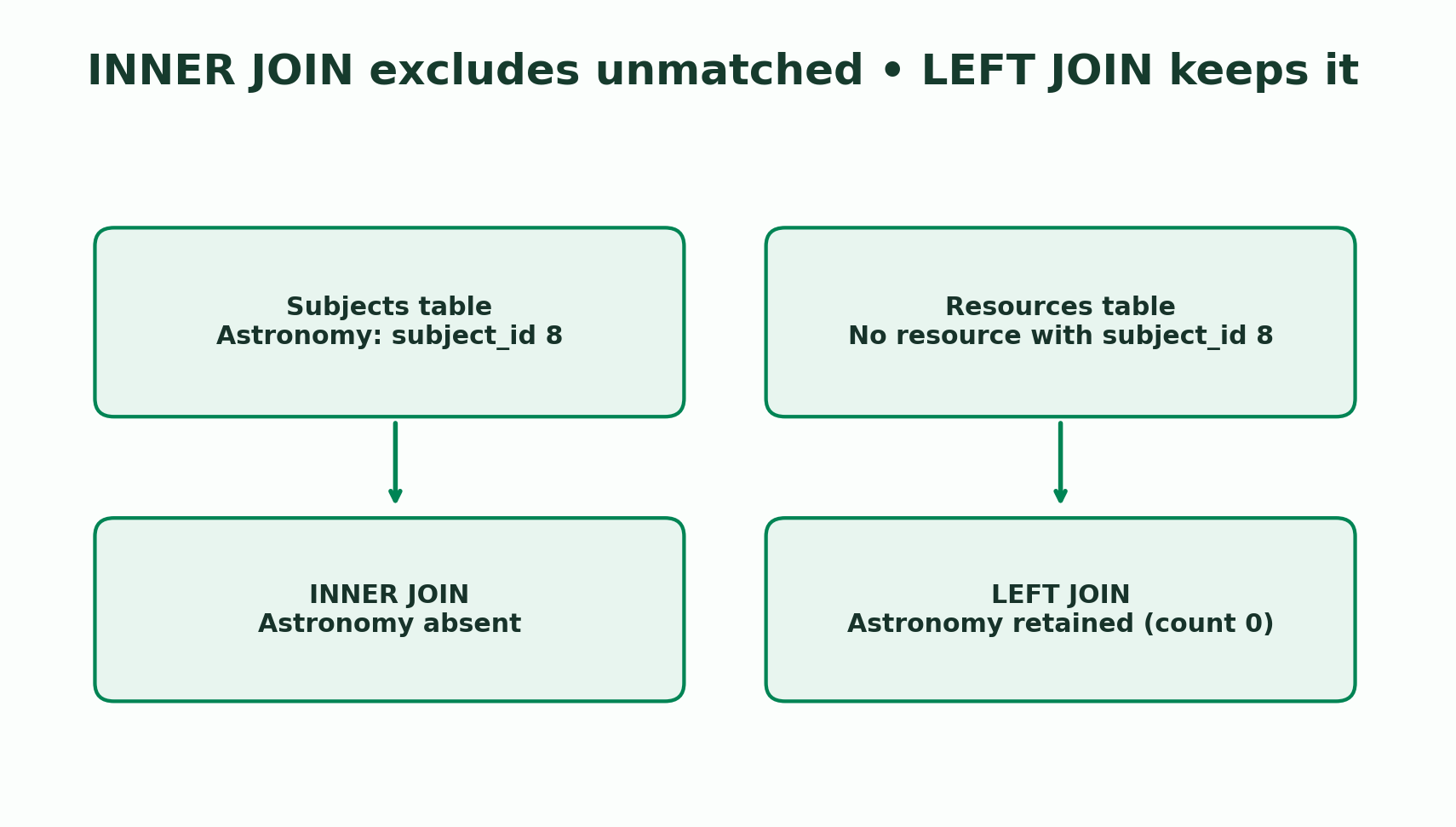
How it works: An INNER JOIN adds a readable subject name to each catalog resource whose subject_id matches. Because this fictional database enforces correct foreign keys, every existing resource has a valid parent subject. Astronomy contributes no row because it contains no resource. The result is a resource listing of 31 rows, not a table of usage events; repeated access is not part of this query.
Common mistake: Leaving out the ON condition can form a Cartesian product and multiply catalog rows.
22. Keep all subjects, including the empty subject
Difficulty: Challenge · Skill: LEFT JOIN, COUNT key. Your task: keep all subjects, including the empty subject. Relevant fields: Subjects(subject_id,subject_name), Resources(subject_id,resource_id). Read the relationship diagram, decide what one row should represent, and write your own SQL before opening a hint.
Hint for question 22
Start from Subjects and count r.resource_id, not COUNT(*).
Reveal verified SQL, result and explanation — Q22
SELECT s.subject_name, COUNT(r.resource_id) AS resource_total
FROM Subjects s LEFT JOIN Resources r ON r.subject_id=s.subject_id
GROUP BY s.subject_id, s.subject_name
ORDER BY s.subject_name;
Verified result: 8 rows (complete set shown). Executed against the unchanged SQLite 3.46.1 database.
| subject_name | resource_total |
|---|---|
| Astronomy | 0 |
| Biology | 5 |
| Chemistry | 4 |
| Computer Science | 5 |
| Economics | 4 |
| Geography | 4 |
| Mathematics | 5 |
| Physics | 4 |
How it works: Every subject remains in the output because Subjects is the left table. Astronomy has no matching right-side resource, so COUNT(r.resource_id) gives zero. If COUNT(*) were used, SQLite would count the preserved placeholder row and misleadingly report one for that subject. The group totals sum to 31, which independently confirms the number of catalog resources.
Common mistake: COUNT(*) after a LEFT JOIN can overstate the count of matching rows for unmatched parents.
23. Locate the catalog resource that no one accessed
Difficulty: Challenge · Skill: LEFT JOIN, IS NULL. Your task: locate the catalog resource that no one accessed. Relevant fields: Resources(resource_id,resource_title), ResourceUsage(resource_id,usage_id). Read the relationship diagram, decide what one row should represent, and write your own SQL before opening a hint.
Hint for question 23
Start from Resources, retain all rows, then test u.usage_id IS NULL.
Reveal verified SQL, result and explanation — Q23
SELECT r.resource_title, r.resource_id
FROM Resources r LEFT JOIN ResourceUsage u
 ON u.resource_id=r.resource_id
WHERE u.usage_id IS NULL
ORDER BY r.resource_id;
Verified result: 1 row (complete set shown). Executed against the unchanged SQLite 3.46.1 database.
| resource_title | resource_id |
|---|---|
| Market Structures | 31 |
How it works: The catalog resource Market Structures has resource_id 31 but no matching usage event. LEFT JOIN preserves it, and the NULL test isolates unmatched records. An INNER JOIN would eliminate it before the WHERE clause could find it. This teaches an important analytical distinction: absence of usage is a fact about the constructed log, not proof that the resource has little educational value.
Common mistake: An INNER JOIN cannot reveal catalog entries that have no matching usage row.
24. Find student codes that accessed three or more different resources
Difficulty: Challenge · Skill: COUNT DISTINCT, HAVING. Your task: find student codes that accessed three or more different resources. Relevant fields: Students(student_code,student_id), ResourceUsage(student_id,resource_id). Read the relationship diagram, decide what one row should represent, and write your own SQL before opening a hint.
Hint for question 24
Group usage by student, and use HAVING on COUNT(DISTINCT u.resource_id).
Reveal verified SQL, result and explanation — Q24
SELECT st.student_code, COUNT(DISTINCT u.resource_id) AS different_resources
FROM Students st JOIN ResourceUsage u ON st.student_id=u.student_id
GROUP BY st.student_id, st.student_code
HAVING COUNT(DISTINCT u.resource_id) >= 3
ORDER BY different_resources DESC, st.student_code;
Verified result: 23 rows; first 5 shown. Executed against the unchanged SQLite 3.46.1 database.
| student_code | different_resources |
|---|---|
| STU-004 | 11 |
| STU-024 | 9 |
| STU-006 | 8 |
| STU-017 | 8 |
| STU-002 | 7 |
How it works: Twenty-three fictional student codes met the minimum of three different resources. COUNT DISTINCT prevents repeated sessions for the same resource from inflating the variety count. HAVING filters students after their distinct resource totals have been calculated, and the ordering puts the most varied activity first. The displayed five rows are only a preview; the companion JSON has all twenty-three verified rows.
Common mistake: COUNT(*) counts visits, not different resources, and may admit students who repeat just one item.
25. Find resources longer than the catalog average
Difficulty: Challenge · Skill: scalar subquery. Your task: find resources longer than the catalog average. Relevant fields: Resources(resource_title,estimated_minutes). Read the relationship diagram, decide what one row should represent, and write your own SQL before opening a hint.
Hint for question 25
Use an inner SELECT AVG(estimated_minutes) as the comparison value.
Reveal verified SQL, result and explanation — Q25
SELECT resource_title, estimated_minutes
FROM Resources
WHERE estimated_minutes > (
 SELECT AVG(estimated_minutes) FROM Resources
)
ORDER BY estimated_minutes DESC, resource_title;
Verified result: 15 rows; first 4 shown. Executed against the unchanged SQLite 3.46.1 database.
| resource_title | estimated_minutes |
|---|---|
| Functions Practice | 60 |
| Genetics Revision | 60 |
| Programming Logic | 60 |
| Electric Circuits | 55 |
How it works: The nested query computes the mean estimated duration once as a scalar value, and the outer WHERE compares each resource against it. Fifteen resources exceed the approximately 37.26-minute catalog mean. This approach adapts automatically if the catalog changes, unlike copying a fixed threshold into the query. These values remain estimates, not time spent by students in actual sessions.
Common mistake: Averages calculated from Resources and ResourceUsage represent different units and must not be interchanged.
26. Create three duration bands using CASE
Difficulty: Challenge · Skill: CASE WHEN. Your task: create three duration bands using case. Relevant fields: Resources(resource_title,estimated_minutes). Read the relationship diagram, decide what one row should represent, and write your own SQL before opening a hint.
Hint for question 26
Define Short ≤25, Standard 26–45, Extended >45 using ordered WHEN conditions.
Reveal verified SQL, result and explanation — Q26
SELECT resource_title, estimated_minutes,
 CASE WHEN estimated_minutes <= 25 THEN 'Short'
      WHEN estimated_minutes <= 45 THEN 'Standard'
      ELSE 'Extended' END AS duration_band
FROM Resources
ORDER BY estimated_minutes, resource_title;
Verified result: 31 rows; first 3 shown. Executed against the unchanged SQLite 3.46.1 database.
| resource_title | estimated_minutes | duration_band |
|---|---|---|
| Introduction to Algorithms | 15 | Short |
| Linear Equations | 15 | Short |
| Opportunity Cost | 15 | Short |
How it works: CASE creates a new derived duration_band in the result without editing the source table. The first WHEN catches times through 25 minutes, and the second catches values through 45 that failed the first. Larger values become Extended. The labels are classroom conventions for this question, not prescribed educational categories. Explain what happens at 25 and 45 when checking boundary cases.
Common mistake: Overlapping CASE conditions are not evaluated independently: only the first matching branch is chosen.
27. Calculate measured mean session time for each subject
Difficulty: Challenge · Skill: multiple LEFT JOINs, AVG. Your task: calculate measured mean session time for each subject. Relevant fields: Subjects, Resources, ResourceUsage(minutes_spent). Read the relationship diagram, decide what one row should represent, and write your own SQL before opening a hint.
Hint for question 27
Preserve every subject through both LEFT JOINs; COUNT the nonmissing minutes.
Reveal verified SQL, result and explanation — Q27
SELECT s.subject_name, COUNT(u.minutes_spent) AS measured,
 ROUND(AVG(u.minutes_spent),1) AS mean_minutes
FROM Subjects s
LEFT JOIN Resources r ON r.subject_id=s.subject_id
LEFT JOIN ResourceUsage u ON u.resource_id=r.resource_id
GROUP BY s.subject_id,s.subject_name
ORDER BY s.subject_name;
Verified result: 8 rows (complete set shown). Executed against the unchanged SQLite 3.46.1 database.
| subject_name | measured | mean_minutes |
|---|---|---|
| Astronomy | 0 | NULL |
| Biology | 24 | 59.8 |
| Chemistry | 16 | 58.4 |
| Computer Science | 29 | 48.8 |
| Economics | 9 | 47.8 |
| Geography | 19 | 61.1 |
| Mathematics | 30 | 48.5 |
| Physics | 24 | 46.7 |
How it works: This subject-level summary connects three tables and retains the empty Astronomy subject. AVG ignores NULL measurement values and returns NULL for Astronomy because there are no measured sessions. The measured column shows the size of each contributing sample, which is useful context for judging averages. Replacing the missing average with zero would incorrectly imply that a zero-minute session was actually observed.
Common mistake: COALESCE may help with display choices but should not erase the distinction between unknown and zero.
28. Rank resources within each subject by visit count
Difficulty: Challenge · Skill: CTE, ROW_NUMBER. Your task: rank resources within each subject by visit count. Relevant fields: Resources, Subjects, ResourceUsage. Read the relationship diagram, decide what one row should represent, and write your own SQL before opening a hint.
Hint for question 28
First aggregate visits per resource in a CTE; then partition ranks by subject.
Reveal verified SQL, result and explanation — Q28
WITH counts AS (
 SELECT s.subject_name, r.resource_title, r.resource_id,
        COUNT(u.usage_id) AS visits
 FROM Resources r JOIN Subjects s ON s.subject_id=r.subject_id
 LEFT JOIN ResourceUsage u ON u.resource_id=r.resource_id
 GROUP BY r.resource_id
)
SELECT subject_name, resource_title, visits,
 ROW_NUMBER() OVER (PARTITION BY subject_name
   ORDER BY visits DESC, resource_title, resource_id) AS position
FROM counts
ORDER BY subject_name, position;
Verified result: 31 rows; first 4 shown. Executed against the unchanged SQLite 3.46.1 database.
| subject_name | resource_title | visits | position |
|---|---|---|---|
| Biology | Genetics Revision | 8 | 1 |
| Biology | Photosynthesis Practice | 6 | 2 |
| Biology | Cells and Microscopes | 5 | 3 |
| Biology | Ecosystems Quiz | 3 | 4 |
How it works: The CTE gives each catalog resource exactly one usage count. The window function ROW_NUMBER then ranks resources within each subject, resetting position at each new subject. Sorting ties by title and ID produces a deterministic sequence. ROW_NUMBER always allocates separate positions, unlike RANK, which can assign equal ranks to tied records. The count includes the unused Market Structures resource as a zero-use entry.
Common mistake: Using a window function without deciding the resource-level grouping can rank events rather than resources.
29. Summarize events and recorded minutes by month
Difficulty: Challenge · Skill: strftime, GROUP BY, SUM. Your task: summarize events and recorded minutes by month. Relevant fields: ResourceUsage(access_date,minutes_spent). Read the relationship diagram, decide what one row should represent, and write your own SQL before opening a hint.
Hint for question 29
Use strftime(‘%Y-%m’,access_date) to obtain a SQLite month key.
Reveal verified SQL, result and explanation — Q29
SELECT strftime('%Y-%m', access_date) AS month,
 COUNT(*) AS usage_events,
 SUM(minutes_spent) AS measured_minutes
FROM ResourceUsage
GROUP BY strftime('%Y-%m', access_date)
ORDER BY month;
Verified result: 5 rows (complete set shown). Executed against the unchanged SQLite 3.46.1 database.
| month | usage_events | measured_minutes |
|---|---|---|
| 2026-01 | 33 | 1635 |
| 2026-02 | 36 | 2230 |
| 2026-03 | 27 | 1210 |
| 2026-04 | 32 | 1510 |
| 2026-05 | 32 | 1365 |
How it works: The original fictional dates span five months in 2026. The monthly event totals add to 160, and the measured-minute totals add to 7,950. The SUM ignores nine NULL duration entries, while COUNT(*) still includes those event rows. This example uses the SQLite date-function syntax appropriate to the actual environment rather than borrowing DATE_TRUNC from another SQL dialect.
Common mistake: Monthly usage events and monthly distinct students are different measures, even when both use the same date field.
30. Produce the complete six-column subject analytics report
Difficulty: Challenge · Skill: three-table joins, distinct counts, conditional sums. Your task: produce the complete six-column subject analytics report. Relevant fields: Subjects, Resources, ResourceUsage. Read the relationship diagram, decide what one row should represent, and write your own SQL before opening a hint.
Hint for question 30
Start from all Subjects; count resources and students DISTINCT, but events by usage_id.
Reveal verified SQL, result and explanation — Q30
SELECT s.subject_name,
 COUNT(DISTINCT r.resource_id) AS resources,
 COUNT(u.usage_id) AS usage_events,
 COUNT(DISTINCT u.student_id) AS distinct_students,
 COALESCE(SUM(u.minutes_spent),0) AS measured_minutes,
 COALESCE(SUM(CASE WHEN u.completed=1 THEN 1 ELSE 0 END),0)
  AS completed_sessions
FROM Subjects s
LEFT JOIN Resources r ON r.subject_id=s.subject_id
LEFT JOIN ResourceUsage u ON u.resource_id=r.resource_id
GROUP BY s.subject_id,s.subject_name
ORDER BY usage_events DESC, s.subject_name;
Verified result: 8 rows (complete set shown). Executed against the unchanged SQLite 3.46.1 database.
| subject_name | resources | usage_events | distinct_students | measured_minutes | completed_sessions |
|---|---|---|---|---|---|
| Mathematics | 5 | 32 | 16 | 1455 | 22 |
| Computer Science | 5 | 31 | 16 | 1415 | 19 |
| Biology | 5 | 25 | 18 | 1435 | 18 |
| Physics | 4 | 25 | 16 | 1120 | 11 |
| Geography | 4 | 20 | 16 | 1160 | 17 |
| Chemistry | 4 | 18 | 14 | 935 | 10 |
| Economics | 4 | 9 | 8 | 430 | 7 |
| Astronomy | 0 | 0 | 0 | 0 | 0 |
How it works: The final capstone combines Subjects, Resources and ResourceUsage without mistaking repeated access events for duplicate catalog resources. COUNT(DISTINCT r.resource_id) counts each subject’s resources; COUNT(u.usage_id) counts events; COUNT(DISTINCT u.student_id) counts people within the subject. The two SUM expressions add measured minutes and completed flags. The eight output rows total 31 catalog resources, 160 usage events, 7,950 recorded minutes and 104 completed sessions. Astronomy is retained with zeros. Distinct student counts across subjects must not be added together to infer unique students overall, because one person may access several subjects. This is an auditable result from fictional records, not evidence about real learners.
Common mistake: Joining on wrong keys or using COUNT(r.resource_id) instead of COUNT(DISTINCT r.resource_id) would inflate resource totals.

Check your answer before deciding it is correct
A SQL query may execute without errors and still answer the wrong question. Compare the returned column names, the number of rows, their values and ordering, and any NULL markers. Check whether each output row represents a resource, a usage event, a student, a subject or an aggregate group. A frequent mistake is calling a count of visits a count of independent learners.
For large result sets, this page deliberately shows a preview with its verified total row count; the downloadable verified_30_sql_results.json contains the complete output for each exercise. If you change a query, execute it again—do not compare a new dataset or a modified filter with an old result and assume the mismatch proves an error. More than one SQL expression can be logically correct; the important test is whether the query remains correct for edge cases.
Use five consistency checks: all catalog resource counts should total 31, usage-event counts should total 160, the number of marked-completed events should total 104, monthly recorded study durations should sum to 7,950 minutes, and the database should preserve Astronomy with zero resources. For the final challenge, do not sum the subject-level distinct_students column and label it the number of different people across the entire database, because students can appear under several subjects.
SQL skills checklist and the 60-point self-assessment
The printable checklist covers fourteen competencies: selecting columns, filtering, sorting, aggregation, grouping, HAVING, joins, distinct counts, NULL handling, subqueries, CTEs, introductory window functions, interpreting outputs and reporting a joined analysis. Review each skill when you can write an example, explain why it works and identify at least one common mistake. The workbook does not store ticked boxes or grades online, so you can track progress on paper without an account.
| Section | Questions | Points per correct question | Maximum |
|---|---|---|---|
| Foundations | 1–10 | 1 | 10 |
| Aggregation and analysis | 11–20 | 2 | 20 |
| Relational challenges | 21–30 | 3 | 30 |
| Total | 30 questions | — | 60 |
The suggested maximum is 10×1 + 10×2 + 10×3 = 60 points. This is an informal self-study rubric, not an official qualification or a standardized examination. Give yourself credit only when both your SQL and its interpretation are correct. If an answer is wrong, record the underlying skill—such as WHERE versus HAVING or INNER versus LEFT JOIN—and attempt another similar task later. Avoid memorizing the exact data values as a substitute for learning the underlying query.
Troubleshooting common SQL errors
Syntax problems: Look for missing commas, parentheses and quotation marks; misspelled column names; referencing a table alias that was never declared; and confusing SQL keywords with string values. When you see an error such as “no such column,” check the actual schema, including spelling and which table owns the field. Try a tiny SELECT against each table before rebuilding a long query. Use quotes around text values such as 'Beginner'.
Filtering problems: Use IS NULL rather than = NULL, and put GROUP BY aggregate filters in HAVING. Parenthesize mixed AND/OR conditions so the intended logic is obvious. Define the exact boundaries for CASE duration bands; a value of 25 belongs in Short, while 45 belongs in Standard under our teaching convention. Check the dialect before copying date functions from another SQL engine.
Aggregation and join problems: Missing ON conditions can multiply results. Legitimate one-to-many joins also repeat a resource identifier for every usage event; use COUNT(DISTINCT r.resource_id) when counting catalog resources after a usage join. For unmatched LEFT JOIN rows, COUNT(*) can return one while COUNT(r.resource_id) correctly returns zero. Aggregate AVG excludes NULL durations, and LIMIT without ORDER BY is not a reliable way to find highest or lowest records.
Interpretation problems: If query Q30 appears to show more than 31 resources when summed, check whether you counted each resource once or once per visit. If monthly totals do not equal 160, verify the dates and filtering conditions. If a category shows zero average minutes, consider whether it actually has no measurements and should display NULL. These checks matter more than simply obtaining a result that resembles a screenshot.
Safe SQL, privacy and responsible data interpretation
The database uses entirely fictional identifiers. Do not substitute personal school records, private marks or contact details without appropriate authorization. All 30 workbook solutions are read-only SELECT queries. Avoid running DROP, DELETE or UPDATE on important databases without permission, backups and a clear reason. In Python applications, use parameter placeholders for untrusted values instead of constructing SQL strings by concatenating input. Table and column identifiers need separate validation against allowed names.
The capstone shows what is recorded in a fictional access log. A high number of sessions does not prove that students learned more, that a subject is better taught, or that an individual is more capable. Recorded study minutes may omit sessions with NULL values, and the database does not include direct evidence about examination performance or learning outcomes. Make the difference between descriptive statistics and causal claims explicit.
Using the workbook for revision, practical examinations and interviews
For classroom revision, attempt a small number of problems without hints and explain each query in ordinary language. For a practical assessment, identify the requested output unit before writing the SQL; sketch the relationship keys before joining. For an entry-level interview, speak through your assumptions, test a small part of the query, and explain how NULLs or duplicate event rows could affect the result. Completing these 30 questions is good preparation, but it does not guarantee mastery of every SQL dialect or interview format.
Four-week SQL practice roadmap
| Week | Questions | Study action |
|---|---|---|
| Week 1 | 1–10 | Practise SELECT, WHERE, sorting and LIMIT; explain why order matters |
| Week 2 | 11–20 | Compute aggregates and completion percentages; identify denominator and missingness |
| Week 3 | 21–27 | Reason about JOINs, empty cases, distinct students, CASE and averages |
| Week 4 | 28–30 | Write CTEs, rank resources, summarize dates and complete the six-column report |
Aim to solve each question independently before you read the solution. When a difficult query is incorrect, identify which part fails, repair it, and then retry from memory on another day. Consider presenting the final report to a classmate: describe why Astronomy remains present, why Mathematics has 32 usage events, and why summing distinct student counts across subjects can exaggerate the overall learner total. The weekly schedule is flexible; understanding matters more than speed.
Download the verified SQL practice resources
These printable files are already hosted in the Notes for SHS WordPress media library: 30 SQL Practice Questions — Questions-Only PDF, Complete SQL Answers and Explanations PDF, and Printable SQL Skills Checklist. The full companion ZIP, SQLite .db file, deterministic setup script, all-solution .sql file and complete verified query-output JSON are supplied with the publication completion report. The connected WordPress media tool does not support those code/archive formats, so the article does not invent links to them.

Optional Coursera and Udemy SQL learning resources
The workbook and downloadable exercises are free to use with SQLite; no paid course is required. These are additional structured-learning options. Disclosure: approved Notes for SHS affiliate tracking URLs could not be verified for this task, so the links below are ordinary official course links, not claims of commission, discounts or certifications. Courses may use other SQL dialects, so verify syntax before running examples in the SQLite workbook.
SQL for Data Science
Coursera / UC Davis: a structured introduction to SQL querying and data analysis, with exercises and practice problems.
The Complete SQL Bootcamp
Udemy: additional structured SQL queries and exercises. It teaches PostgreSQL, whose dialect differs in some respects from SQLite.
Frequently asked questions
How can beginners practise SQL for free?
Download the fictional SQLite database and open it with DB Browser for SQLite, or use Python’s included sqlite3 module. Attempt each question before expanding the solutions.
Can high school students complete these exercises?
Yes. The first ten questions assume only basic computer skills, and later levels introduce joins, aggregates, CTEs and simple rankings gradually.
Do I need a paid SQL server?
No. SQLite is embedded and works with a local .db file. A free desktop application or Python is enough.
Why do SQL joins sometimes create duplicate-looking rows?
One catalog resource can match several usage events, so a one-to-many join returns one row per matching combination. Count distinct entities when your question requires them.
How can I check whether my SQL answer is correct?
Compare the selected columns, number of rows, values, NULL handling, sort order and the purpose of each aggregate with the executed reference output.
What is the difference between WHERE and HAVING?
WHERE filters input rows before grouping, while HAVING filters groups using conditions such as COUNT(*) >= 6 after grouping.
Can the same question have different correct SQL solutions?
Yes. Different queries can express the same intended logic. Test them against the supplied database and consider how they handle ties, missing values and new records.
What should I do if a query returns zero rows?
Verify table names, exact filter values, join conditions and whether the task expected any matches. A true empty result can be correct.
Are these questions useful for data science interviews?
They practise foundational data retrieval, aggregation, joins and reasoning, but no single set is sufficient for every employer, database engine or advanced role.
What should I learn after the thirty exercises?
Practise further joins, indexes, query plans, window functions and database projects. Extend the same fictional database without using private student records.
Related reading and trusted SQL documentation
Review verified Notes for SHS lessons: SQL for Data Science Beginners, How to Use Pandas in Python, Build Your First Data Science Project, 25 Python Data Analysis Exercises and Introduction to Data Science. These are previously confirmed published staging posts, not unverified draft titles.
The examples follow the SQLite SELECT documentation, aggregate-function reference, window-function documentation, Python sqlite3 guide and the official DB Browser for SQLite site. All SQL solutions use the same SQLite dialect and were executed using the installed SQLite 3.46.1 runtime.
Conclusion: learn SQL by answering real questions
You have progressed from selecting columns and filtering catalog rows to calculating session summaries, preserving unmatched subjects, ranking resources and producing a six-column report. Every exercise uses the same documented relational database, so you can rerun it, compare your result and understand why an answer is correct. The deepest lesson is not to memorize queries; it is to define the analytical question precisely, identify the correct data relationships and verify the evidence.
Repeat the questions you found difficult without opening the answers. Change one condition, rerun your SQL and explain how the result changes. Finally, build a fresh report of your own using the fictional dataset and challenge a classmate to check its row counts and join logic. Consistent, evidence-based practice is the foundation for more advanced SQL, data analytics and responsible data science.